


Odoo ERP For Accounting In US For Growing Businesses
Simplify US accounting with an integrated ERP system.
Most US businesses don’t plan to outgrow their accounting software. It just happens. Odoo ERP for accounting helps businesses move beyond disconnected tools like QuickBooks, spreadsheets, and standalone accounting applications as they grow. What works in the early years often becomes a bottleneck when headcount increases, sales volume rises, inventory must sync with finance, and month end closes become slow, manual processes spread across multiple systems.
That’s the gap Odoo ERP is built to close. Instead of treating accounting as a standalone app, Odoo connects your books directly to sales, inventory, purchasing, HR, and operations, so financial data updates itself instead of waiting for someone to rekey it. At AI-IoT Geeks, we have configured Odoo for businesses across several industries and time zones, which means this guide reflects patterns we have seen play out in real implementations, not just documentation.
In this guide, we’ll break down what Odoo accounting actually does, how it handles requirements specific to the US such as sales tax and year end vendor tax filings, and what a successful implementation looks like.

What Is Odoo Accounting?
Understand how Odoo accounting connects financial management with your entire business.
Odoo Accounting refers to the financial management module inside the broader Odoo ERP suite. Odoo itself is a modular, open source platform. Businesses can start with just accounting and later add CRM, inventory, HR, or manufacturing without switching systems.
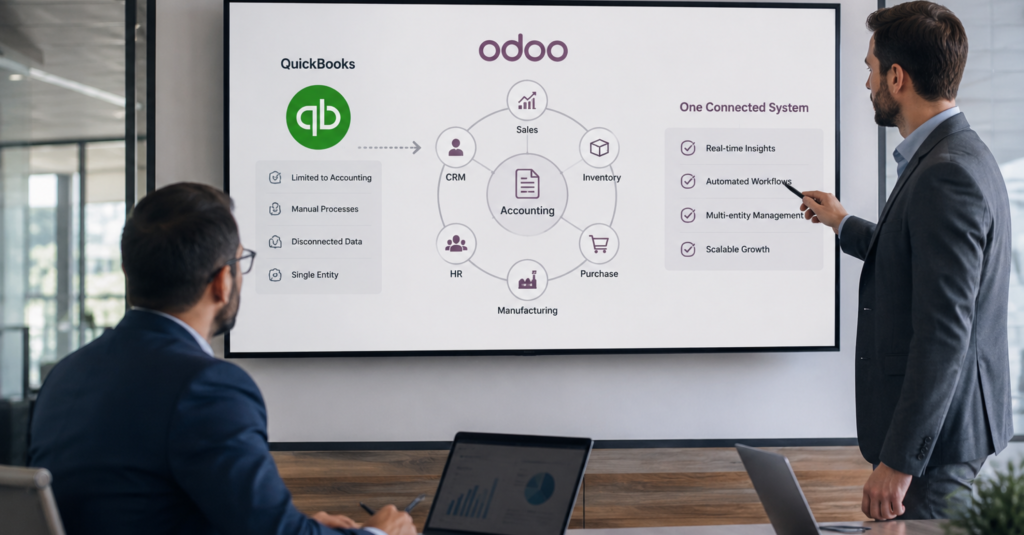
What sets it apart from standalone tools like QuickBooks or Xero is integration. When a sales order is confirmed, Odoo generates the invoice automatically. When a purchase order is received, the financial entry is created without manual posting. Finance teams stop chasing numbers from other departments because the numbers are already there.
Our team at AI-IoT Geeks approaches every Odoo accounting engagement the same way we approach any ERP implementation: we start by understanding how money actually moves through the business before we touch a single setting. That grounding in real operational context is usually the difference between an Odoo rollout that finance teams trust and one they quietly work around.

What Are The Key Features Of Odoo ERP For Accounting In US Businesses?
Explore the accounting features that simplify finance for US businesses.
The advanced capabilities of Odoo ERP for accounting help finance teams automate routine tasks and improve financial accuracy.
1.Invoicing And Accounts Receivable
Odoo creates invoices straight from confirmed sales orders, with no copy pasting from a CRM or spreadsheet. Businesses can automate:
- Invoice generation tied to delivery confirmation
- Recurring billing for subscription or retainer clients
- Automatic payment reminders at set intervals
- Self service customer payment portals
Outstanding balances, overdue accounts, and cash flow projections update the moment a payment is recorded. Businesses relying on manual invoicing often lose days each month simply chasing signatures, approvals, and payment confirmations. Automating that chain frees the finance team to focus on collections strategy and forecasting instead of data entry. In our own client work, this is usually the first area where teams notice the difference, since overdue invoices stop slipping through the cracks and cash visibility improves almost immediately.
2.Bank Reconciliation
Bank feeds import directly into Odoo and match against journal entries using rules the finance team defines, cutting out one of the most time consuming manual tasks in any accounting department. For businesses running multiple bank accounts, reconciliation happens from a single screen instead of several separate logins.
Reconciliation rules can also be refined over time, so the system gets smarter about matching recurring vendors, payroll runs, and standing transfers the longer it is used. When we configure this for clients, we typically spend extra time tuning these matching rules early on, because a well tuned reconciliation setup is what turns month end close from a multi day exercise into something closer to a same day task.
3.Tax Reporting And GAAP Compliance
Odoo supports both accrual and cash basis accounting and aligns with US GAAP standards. Tax is calculated automatically per transaction based on configured rules, and for operations spanning multiple states, tax logic can be set per location so the correct rate applies every time. That’s a common pain point for ecommerce and service businesses selling across state lines.
Getting this right requires more than flipping a setting. Tax jurisdictions change, nexus rules shift as businesses grow into new states, and GAAP reporting expectations vary depending on whether a company is preparing for a lender, an investor, or an audit. This is an area where working with a partner who understands both the software and US accounting practice matters. It’s a core part of how AI-IoT Geeks scopes every accounting implementation before going live, since a tax rule that is wrong on day one tends to stay wrong until someone notices it in an audit.
4.Multi Currency And Multi Entity Support
For US companies with international suppliers, overseas clients, or more than one legal entity, Odoo manages:
- Automatic exchange rate updates
- Separate charts of accounts per entity
- Intercompany transactions with automated elimination entries
- Consolidated reporting across all entities from a single dashboard
This matters most for businesses that are scaling internationally or running parent and subsidiary structures, where consolidated reporting can otherwise become a spreadsheet nightmare during close. We have built multi-entity Odoo environments for clients operating across different regions and currencies, and the recurring lesson is that entity structure should be mapped out carefully before configuration begins, not adjusted after the fact.
5.Real Time Financial Dashboards
Cash flow, receivables and payables aging, budget versus actual, and profit and loss are all visible live from the finance dashboard, with no separate BI tool needed for standard reporting.
For leadership teams, this shifts financial reporting from a monthly lagging exercise to something closer to real time decision support. Instead of waiting for a finance team to pull and format reports, executives can check dashboards directly. Where clients need something beyond Odoo’s native reporting, our AI and machine learning team can layer on predictive forecasting or anomaly detection so the finance function moves from reporting what happened to anticipating what happens next.

How Does Odoo ERP Meet US Accounting And Compliance Requirements?
Learn how Odoo supports US tax, payroll, payments, and financial compliance.
One of the biggest advantages of Odoo ERP for accounting is its ability to support state specific tax requirements, GAAP reporting, payroll integrations, and secure financial reporting for growing businesses.
A generic ERP rollout won’t automatically satisfy US compliance needs. A properly configured Odoo instance should cover:
- State and local sales tax, calculated automatically across jurisdictions.
- Vendor tax form reporting, generating and filing year end vendor tax forms per IRS requirements.
- Payroll integration, connecting to US payroll providers or Odoo’s own payroll module for labor law compliance.
- ACH and electronic payments, supporting modern US banking rails.
- GAAP compliant financial statements, built to the standards auditors and lenders expect.
This is where generic “Odoo is great” advice falls short. These settings have to be configured correctly during implementation, not left to default. We have seen businesses adopt Odoo on their own, only to discover months later that sales tax was being applied incorrectly in a state where they had crossed an economic nexus threshold, or that vendor records were missing the information needed for year end tax filings. Catching these gaps early, during setup, is far less costly than fixing them retroactively, which is why our implementation process always includes a dedicated compliance review before going live.

Why Are US Businesses Moving To Odoo Over QuickBooks?
See why growing US businesses choose Odoo for connected financial management.
QuickBooks is built for single entity, transaction level bookkeeping. It handles the basics well, but it starts to strain once a business needs inventory across multiple locations tied to accounting, multiple subsidiaries, or automated workflows between departments. Odoo isn’t just a bigger QuickBooks. It’s a different architecture where accounting is one connected piece of the whole business, alongside AI and automation tools that can flag anomalies, forecast cash flow, and cut manual reconciliation time further.
Businesses we work with typically make this move at a specific inflection point: when finance stops being able to trust the numbers coming from other departments because those departments are working in disconnected systems. Once inventory, sales, and purchasing all feed the same ledger automatically, that trust gap tends to close on its own.
How Odoo Accounting Implementation Works?
Odoo Accounting Implementation Process.
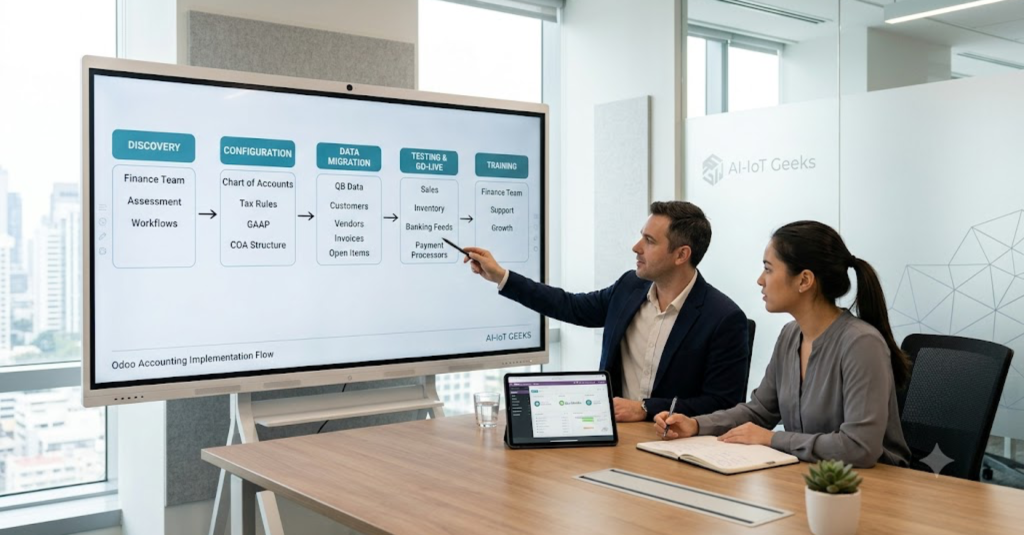
A successful Odoo ERP for accounting implementation begins with understanding business processes before configuring the system.
Odoo delivers its value only when it’s configured to match how the business actually runs. A solid implementation typically follows this path:
1.Discovery And Assessment
Mapping current accounting workflows, tax obligations, and reporting gaps. This stage means sitting down with the finance team to understand how invoices actually get approved, how payroll is currently processed, which reports leadership pulls every month, and where the current system falls short. Skipping or rushing this step is the single biggest predictor of a rollout that has to be reworked later.
2.Chart Of Accounts And Tax Rule Setup
Building the structure around the business rather than a generic template. Every account, cost center, and tax rule gets configured based on how the business actually reports and files, not copied from a default Odoo template. For US businesses, this is also where sales tax jurisdictions, nexus rules, and GAAP reporting requirements get built into the system correctly from the start.
3.Data Migration
Moving historical records cleanly from QuickBooks or another system. This covers customer and vendor records, open invoices, outstanding bills, and historical transactions needed for year over year reporting. Clean migration matters because errors introduced here tend to surface much later, often during an audit or when a report doesn’t reconcile with prior year numbers.
4.Integration
Connecting accounting to sales, inventory, payroll, and any third party tools. This is what turns Odoo from a standalone accounting app into a connected system, where a confirmed sale automatically creates an invoice and a received purchase order automatically posts to the ledger. Integration also extends to banking feeds, payment processors, and any existing software the business isn’t ready to replace.
5.Testing And go live
Validating reports and reconciliation before cutover. Before the finance team relies on the system for real work, we run parallel testing against the old process, confirm reports match expectations, and verify reconciliation rules are catching transactions correctly. Go live happens once the numbers hold up under scrutiny, not on a fixed calendar date
6.Training And ongoing support
Making sure the finance team can actually run the system day to day. A configuration is only as good as the team’s ability to use it, so training is built around the actual people who will log in every day, not a generic walkthrough. Support continues after launch, since the way a business uses its accounting system tends to evolve as it grows.
Rushed setup is the most common reason Odoo accounting projects underdeliver. Wrong tax rules or a poorly structured chart of accounts creates reporting errors that surface months later at close, usually right when a business can least afford to spend a week untangling them, during an audit, a fundraising round, or a loan application.
At AI-IoT Geeks, we treat discovery as the stage that determines whether everything after it goes smoothly, not as a formality before the “real work” begins. Our team sits down with the finance function directly, not just IT, because the people closing the books every month usually know exactly where the current process breaks down. That direct involvement is also why our implementations tend to hold up well after going live. Configuration decisions get documented and explained to the finance team as we make them, rather than handed over as a finished system nobody but the consultant fully understands.
We’ve carried this same implementation discipline across ERP projects beyond accounting alone, and it’s consistent with how we approach Odoo work generally: scope the business first, configure second, and stay involved after launch rather than disappearing once the system is technically live. If your team is planning an Odoo accounting rollout and wants a second opinion on scope or timeline before committing, book a free strategy call and we’ll walk through what implementation would actually look like for your specific setup.
Who Should Consider Odoo ERP For Accounting?
Businesses That Benefit From Odoo Accounting.
Odoo accounting is a strong fit for:
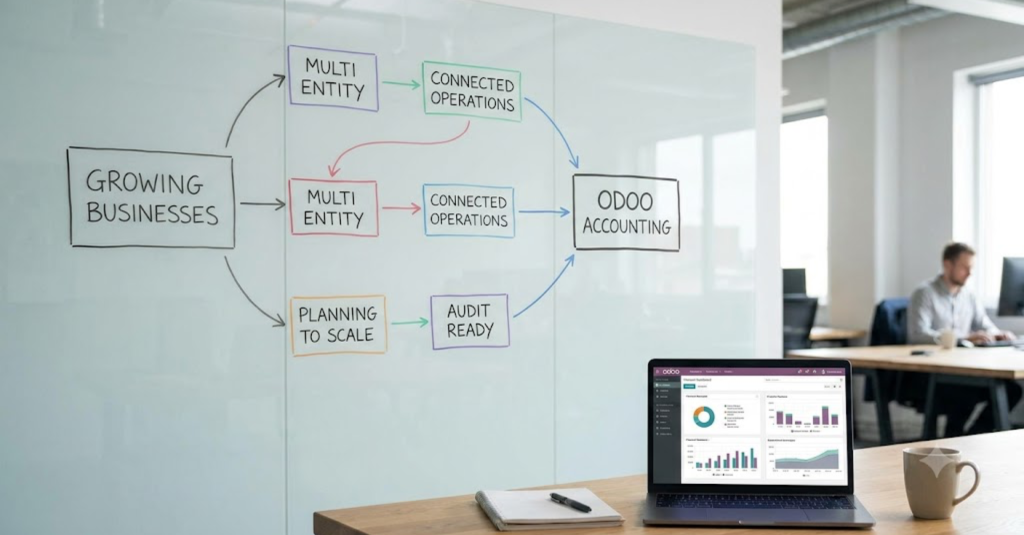
1.Growing Businesses
If your finance team is spending more time exporting data between tools than actually analyzing it, or if QuickBooks reports no longer reflect how the business actually operates, that’s usually a sign the software has stopped keeping pace with the company.
2.Multi Entity Companies
Once a business crosses sales tax nexus thresholds in new states, or starts running more than one legal entity, manual tax tracking and separate books per entity become a real liability. Odoo handles this natively instead of requiring a patchwork of spreadsheets and add ons.
3.Connected Business Operations
Any business where finance is the last to know about a sale, a stockout, or a payroll change is operating with a structural blind spot. Odoo removes that lag by feeding accounting directly from the systems that generate the transactions in the first place.
4.Organizations Planning To Scale
Businesses that expect to add inventory, manufacturing, CRM, or HR modules down the line benefit from starting with Odoo accounting now, since it avoids a second migration later. Starting with the module you need most and expanding as requirements grow is generally a lower risk path than trying to implement everything at once.
5.Audit Ready Businesses
Clean, GAAP compliant reporting and a reliable audit trail matter far more once outside scrutiny enters the picture. Companies preparing for due diligence, a loan application, or investor reporting tend to move to Odoo specifically because the reporting needs to hold up under review, not just look right internally.
If more than one of these describes where your business is right now, that’s usually a reliable signal the conversation is worth having sooner rather than later, since the cost and disruption of migrating tend to grow the longer a business waits.
At AI-IoT Geeks, we’ve worked with businesses across each of these situations, from companies outgrowing QuickBooks to organizations preparing their books for investors or auditors. That range is part of why our Odoo ERP implementation process starts with understanding which of these situations actually applies to you, rather than applying the same rollout playbook regardless of where a business stands.
Why Choose AI-IoT Geeks For Your Odoo Accounting Implementation?
AI-IoT Geeks For Odoo Accounting Implementation.
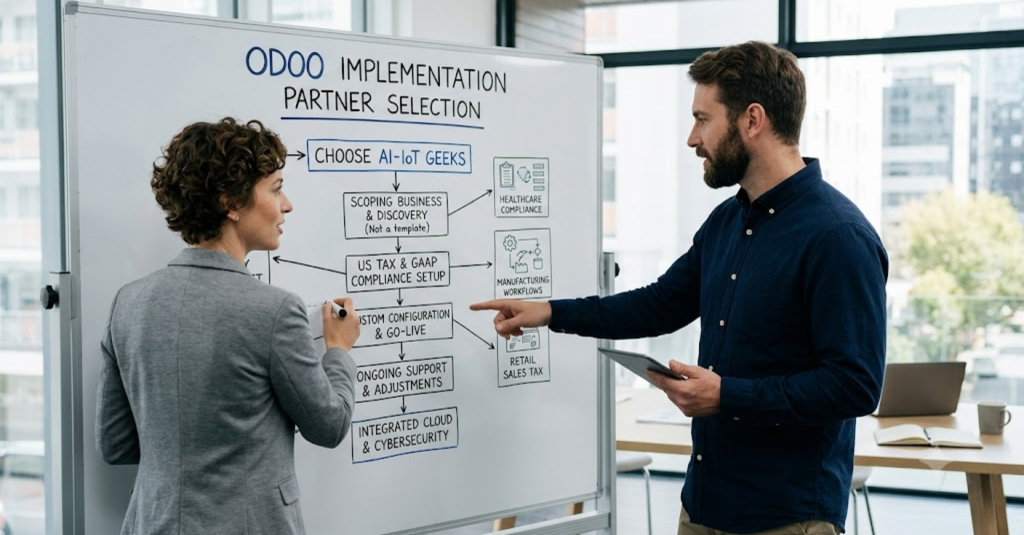
Odoo’s value depends almost entirely on how it’s set up, which means the partner configuring it matters as much as the platform itself. Here’s what working with AI-IoT Geeks actually looks like.
1.We Scope The Business Before We Touch The Software
Every engagement starts with discovery, not a template. We sit down with your finance team to understand how invoices move, how tax obligations are currently handled, and where the existing process breaks down, so the Odoo configuration is built around how your business actually runs rather than a generic accounting setup.
2.We Know US Accounting And Tax Requirements, Not Just The Software
Our Odoo ERP implementation work is built around US specific requirements: state and local sales tax, GAAP compliant reporting, payroll integration, and year end vendor tax filings. Getting Odoo installed is the easy part. Getting the tax and compliance layer right is where most self managed rollouts run into trouble, and it’s where our team spends the most time during setup.
3.Our Support Doesn’t End At Go Live
Accounting needs change as a business grows, and a configuration that fits at launch can fall behind six months later. Our ERP services and support cover customization, troubleshooting, and ongoing adjustments long after the initial rollout, so you’re not left figuring out changes on your own.
4.We Connect Accounting To The Rest Of Your Infrastructure
Financial data doesn’t exist in isolation, and neither should its protection. We pair accounting implementations with cloud infrastructure that keeps systems reliable and cybersecurity practices that keep sensitive financial data protected, rather than treating security as something to bolt on afterward.
5.We Have A Track Record You Can Actually Check
We’ve delivered scalable, connected platforms across finance, operations, and reporting, including a centralized operations management platform and a legal case management system built to streamline workflows and cut down manual data handling. You can browse more of this work in our full case study library rather than taking our word for it.
6.We Understand How Different Industries Actually Use Accounting Data
We support businesses across healthcare,financial services,retail,manufacturing, government and Saas, and the compliance pressures look different in each one. That range shapes how we configure Odoo for every new client, since a healthcare business and a retail operation need very different things from the same accounting stack.
If you’re weighing Odoo against your current setup, or already know you want it and need a partner who’ll actually own the implementation, book a free strategy call with our team.
Conclusion
As businesses grow, accounting becomes more than recording transactions. It needs to support compliance, provide real time financial visibility, and connect seamlessly with the rest of the business. Odoo ERP for accounting in US brings accounting, sales, inventory, purchasing, and operations together on a single platform, helping finance teams reduce manual work, improve reporting accuracy, and stay compliant with US accounting requirements.
At AI-IoT Geeks, we combine Odoo expertise with a practical understanding of US finance and compliance to deliver implementations that are built for long term success. From discovery and configuration to migration, training, and ongoing support, we help businesses adopt Odoo with confidence. Book a free strategy call today to see how Odoo ERP for accounting in US can support your business growth.
Talk to AI-IoT Geeks today and simplify your Odoo accounting implementation journey.
Have any questions in mind
Frequently Asked Questions?
1. How is Odoo accounting different from QuickBooks?
QuickBooks is primarily designed for bookkeeping, while Odoo connects accounting with the rest of your business. It automates workflows across departments, making it a better fit for businesses managing multiple entities, inventory, or complex operations.
2. What features does Odoo accounting include?
Odoo accounting includes invoicing, bank reconciliation, tax management, GAAP compliant reporting, multi currency support, multi entity accounting, real time financial dashboards, and automated financial workflows.
3. Is Odoo accounting suitable for small and growing businesses?
Yes. Businesses can start with the accounting module and add CRM, inventory, manufacturing, HR, or other ERP modules as they grow without changing platforms.
4. Does Odoo ERP support US accounting and tax compliance?
Yes. When properly configured, Odoo supports US sales tax calculations, GAAP compliant financial reporting, payroll integration, ACH payments, and year end vendor tax reporting.
5. How does Odoo accounting implementation work?
Implementation typically includes business discovery, chart of accounts setup, tax configuration, data migration, system integration, testing, user training, and ongoing support to ensure a smooth transition.
6. Can Odoo integrate with inventory, sales, and payroll?
Yes. Odoo connects accounting with inventory, sales, purchasing, payroll, banking, and third party applications, allowing financial data to update automatically across the business.
7. Which businesses benefit most from Odoo ERP for accounting in US?
Odoo is ideal for growing businesses, multi-entity organizations, companies operating across multiple states, businesses preparing for audits, and organizations planning to expand into a full ERP system.
8. Why choose AI-IoT Geeks for Odoo accounting implementation?
AI-IoT Geeks combines Odoo expertise with knowledge of US accounting and compliance requirements. The team provides end to end implementation, customization, migration, integration, training, and ongoing support.