


Introduction To UX Audit
Expertise In UX Audits, User Behavior Analysis, And Product Optimization.
Your website traffic looks healthy. Visitors land on your homepage, browse products, and start the checkout process. Then they abandon their carts. Customer support receives complaints about confusing navigation. Conversion rates plateau despite marketing efforts.
These symptoms point to user experience problems. You know something is wrong, but identifying exactly where users struggle requires systematic evaluation.
Professional UX audit services provide that evaluation. A UX user experience audit examines your digital product against established usability standards, identifies friction points, and delivers actionable recommendations for improvement.
At AI-IoT Geeks, our UI/UX specialists, product strategists, and development teams have worked with startups, SaaS platforms, enterprise systems, healthcare applications, and AI-driven products across global markets. Using predictive UX modeling, heatmap analysis, user journey mapping, usability testing, and performance-focused design strategies, we help businesses identify friction points that impact engagement, conversions, and operational efficiency. Our experience in building and optimizing scalable digital products gives us practical insight into how effective UX directly influences business growth, customer retention, and product adoption.
This blog explains what UX audits involve, when you need one, and how to conduct an effective audit that drives measurable results.

What Is A UX Audit?
Understanding UX Audits, Usability Evaluation, And Experience Improvement.
A UX audit refers to systematic evaluation of your website or application’s user experience. It identifies usability issues that prevent users from completing tasks efficiently and provides evidence-based recommendations for fixing those problems.
A UX design audit evaluates interface usability, navigation structure, accessibility, workflow efficiency, and content presentation to improve the overall digital experience.
Combining hands-on experience with established UX practices, UI/UX team at AI-IoT Geeks ensures audits are accurate, practical, and results-driven.
Unlike usability testing, which observes real users interacting with your product, a UX audit uses established usability guidelines and best practices to evaluate interface design, information architecture, navigation patterns, and content presentation. Auditors examine your product from multiple angles:
- Compliance with usability principles and accessibility standards
- Alignment between user goals and available functionality
- Technical performance impacting user experience
- Comparison against industry benchmarks and competitor experiences
- Analysis of existing analytics data and user feedback
The final report is a prioritized list of findings with specific recommendations for addressing each issue. Organizations use audit results to guide redesigns, inform development roadmaps, and justify resource allocation for UX improvements.
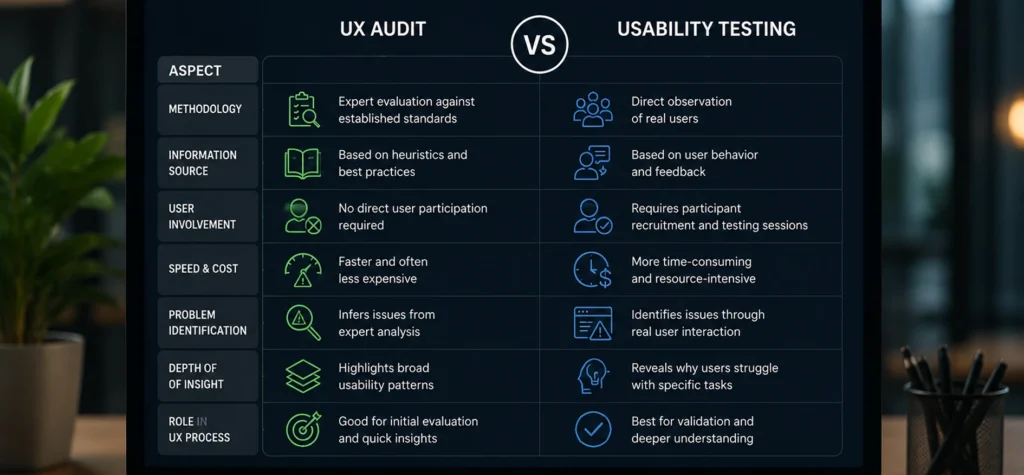
UX Audit vs Usability Testing
Key Differences Between UX Audits And Usability Testing.
Aspect
Methodology
Information Source
User Involvement
Speed & Cost
Problem Identification
Depth Of Insight
Role In UX Process
Strategy
Expert evaluation against established standards
Based on heuristics and best practices
No direct user participation required
Faster and often less expensive
Infers issues from expert analysis
Highlights broad usability patterns
Good for initial evaluation and quick insights
Approach
Direct observation of real users
Based on user behavior and feedback
Requires participant recruitment and testing sessions
More time-consuming and resource-intensive
Identifies issues through real user interaction
Reveals why users struggle with specific tasks
Best for validation and deeper understanding
Both methods work best when used together, audits help spot general issues quickly, while usability testing provides real-world validation and deeper insights.
Our UI/UX experts often combine both approaches to ensure decisions are backed by expert evaluation as well as real user behavior.

When Do You Need A UX Audit?
Common Scenarios Where UX Audits Provide The Most Value.
A website UX audits deliver the most value in specific situations. Understanding these scenarios helps you determine whether an audit addresses your current needs.
Before Major Redesigns
A UX audit helps identify what works, what needs fixing, and what to improve before redesigning, preventing repeated usability issues and guiding better design decisions. This is especially relevant before a full mobile app or website redesign, where usability issues carried over from the old version can quietly resurface in the new one.
When Performance Metrics Decline
Falling conversions, high bounce rates, or increased complaints signal UX problems. An audit uncovers the root causes behind these metrics.
Competitive Benchmarking
A UX audit compares your product with competitors, highlighting strengths, gaps, and opportunities to improve and stand out in the market.
Limited Internal UX Resources
Organizations without UX expertise benefit from audits by gaining expert insights, structured evaluation, and clear direction for improving user experience. This is where partnering with a specialist in Website Development and UX optimization makes the biggest difference, combining technical performance with user-centered design to close the gap between what your product does and what your users actually need.
With experience across industries like healthcare, SaaS, government, manufacturing, retail and finance,and enterprise , our ui/ux team ensures audits are aligned with both user needs and business goals.

How Does The UX Audit Process Work Step-by-Step?
A Structured UX Audit Process For Identifying And Fixing Usability Issues.
Conducting an effective ux audit process audit requires structured methodology. Following these steps ensures comprehensive evaluation and actionable results.
Before starting, many teams rely on a structured UX audit checklist to ensure usability, accessibility, navigation, performance, and user flow issues are reviewed consistently across the entire product.
Step 1: Define Audit Scope And Objectives
To understand how to do a ux audit, start by clarifying what the audit should accomplish and what constraints exist:
- Primary goals: What specific problems need solving? Improving conversion rates, reducing support tickets, or preparing for redesign?
- Audit coverage: Full site evaluation or focused assessment of specific sections like checkout, search, or mobile experience?
- Timeline: How quickly do results need delivery?
- Resources: Budget, team availability, and stakeholder involvement?
- Success metrics: How will you measure whether implemented recommendations succeed?
Clear objectives prevent scope creep and help auditors focus on issues that matter most to your business.
Step 2: Gather Existing Data And Materials
Collect information that provides context about user behavior and product history:
- Analytics data: Traffic patterns, conversion funnels, user flows, bounce rates, and device usage.
- User feedback: Support tickets, survey responses, app store reviews, social media comments.
- Business context: Product requirements, stakeholder interviews, development constraints.
- Previous research: Usability test results, persona documentation, journey maps.
- Competitive benchmarks: Screenshots and notes about competitor experiences.
This background information helps auditors understand why certain design decisions happened and identifies patterns in user complaints or abandonment.
Step 3: Conduct Heuristic Evaluation
Walk through your product as a user would to understand what to look for in ux audit, evaluating each screen and interaction against usability principles. Heuristic evaluation is one of the most trusted methods in UX and the Nielsen Norman Group defines it precisely as “a method for identifying design problems in a user interface where evaluators judge the design against a set of guidelines (called heuristics) that make systems easy to use.” Document findings systematically:
- Take screenshots showing each issue.
- Note which heuristic the problem violates.
- Assess severity from cosmetic to critical.
- Describe the user impact and business consequence.
Multiple evaluators improve results. Different people notice different problems. Having three to five evaluators review the product independently, then comparing findings, typically identifies the majority of usability issues.
Step 4: Organize And Prioritize Findings
Consolidate discoveries into a structured format. Spreadsheets work well for tracking:
- Issue description and location.
- Category and violated heuristic.
- Severity rating.
- Frequency of occurrence.
- Proposed solution.
Prioritize issues by combining severity with business impact. A critical navigation problem affecting all users outweighs cosmetic inconsistencies on rarely-visited pages.
Group related findings. If multiple issues stem from inconsistent button styling, address them together rather than treating each instance as a separate fix.
Step 5: Create Actionable Recommendations
Transform findings into specific, implementable suggestions. Effective recommendations include:
- Clear problem statement: What issue exists and why it matters.
- Specific solution: Concrete changes to implement, not vague suggestions.
- Visual examples: Screenshots or mockups showing the recommended approach.
- Supporting rationale: Why this solution follows best practices.
- Implementation guidance: Technical considerations or design system implications.
Avoid jargon. Development and business stakeholders need to understand recommendations without specialized UX knowledge. Frame suggestions positively, focusing on improvements rather than criticizing existing work.
Step 6: Deliver Results And Support Implementation
Present findings to stakeholders with context about methodology, scope, and limitations. A comprehensive audit report typically includes:
- Executive summary highlighting critical issues.
- Methodology explanation.
- Findings organized by severity and category.
- Detailed recommendations with examples.
- Appendix with additional context or reference materials.
Schedule follow-up sessions to answer questions, review prototypes, and provide guidance during implementation. Audit value comes from applied recommendations, not just documented findings.
AI-IoT Geeks, a UX audit agency follows a structured audit framework refined through multiple client engagements, ensuring every recommendation is practical, prioritized, and aligned with real business impact.

What Are The Essential UX Audit Tools?
Essential Tools For UX Audits, Performance Analysis, And Usability Evaluation.
The right tools make ux performance audit more efficient and comprehensive. These resources cover the major evaluation categories.
1.Analytics And Behavior Tracking
Google Analytics
Traffic patterns, user flows, conversion tracking.
Hotjar
Heatmaps, session recordings, user feedback.
Mixpanel
Event tracking and funnel analysis.
FullStory
Session replay with technical error tracking.
2.Accessibility Evaluation
WAVE
Browser extension for WCAG compliance checking.
axe DevTools
Automated accessibility testing.
Color Contrast Analyzer
Verify text readability.
Screen Readers
NVDA or JAWS for testing navigation.
Accessibility findings often surface compliance gaps too, something we build into every engagement through our cyber security and data-protection practices, since usability and regulatory risk (HIPAA, GDPR, SOC 2) frequently overlap in regulated industries.
3.Performance Testing
Google PageSpeed Insights
Load time and optimization suggestions.
WebPageTest
Detailed performance analysis.
Lighthouse
Comprehensive site quality audit.
4.Documentation And Reporting
Spreadsheets
Track and organize findings systematically.
Screen Capture Tools
Document issues with annotated screenshots.
Loom
Record walkthrough videos explaining problems.
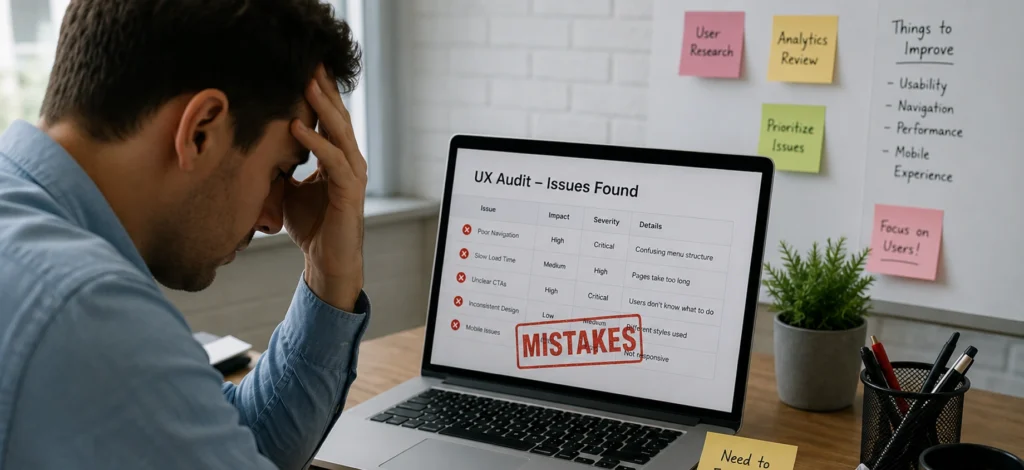
What Common UX Audit Mistakes Should You Avoid?
Common UX Audit Mistakes That Reduce Audit Accuracy And Implementation Success.
Even experienced teams make these audit errors. Recognizing them improves audit quality and implementation success.
1.Auditing Without Clear Goals
Generic audits produce overwhelming findings with no clear priorities. Define specific objectives first , if the goal is mobile conversion, focus there, not on every desktop issue.
2.Ignoring Business Context
Recommendations that ignore constraints rarely get implemented. Understand limitations upfront and offer tiered suggestions: quick wins, medium-term fixes, and long-term ideals.
3.Relying Solely On Expert Opinion
Expert reviews miss real user issues. Combine heuristic findings with analytics and user feedback before recommending changes.
4.Providing Vague Recommendations
“Improve navigation” isn’t actionable. Be specific: add inline validation, show password requirements upfront, display clear field-level error messages.
5.Not Following Up On Implementation
Reports without support get misinterpreted or ignored. Schedule check-ins, track implementations, and measure their impact. Where fixes are repetitive or manual, our RPA development team can help automate the follow-through so recommendations don’t stall after the report is delivered.
From hands-on project experience, our UI/UX team has seen how avoiding these mistakes significantly improves audit success.

How Much Does A UX Audit Cost?
UX Audit Pricing, Business Value, And Success Measurement Factors.
UX audit pricing varies depending on project scope, product complexity, audit depth, and provider expertise. Understanding different pricing approaches helps businesses plan resources effectively and evaluate service proposals more accurately.
Internal Audit Investment
Conducting a UX audit internally requires dedicated time and team involvement rather than direct external spending. A focused evaluation of selected workflows or features may require several days from a UX designer or product team. More comprehensive audits involving multiple user journeys, platforms, and stakeholder reviews can take several weeks.
The overall investment depends on factors such as:
- Product size and complexity
- Number of user flows reviewed
- Team availability
- Research and testing requirements
- Reporting depth and implementation planning
External UX Audit Services
Professional UX audit services can range from basic usability evaluations to detailed enterprise-level assessments with implementation guidance and benchmarking support.
Common engagement types include:
- Focused heuristic reviews for specific features or workflows
- Full website or application UX evaluations
- Enterprise audits with competitor benchmarking and accessibility reviews
- Ongoing optimization support and post-audit consultation
The final pricing depends on the level of analysis, stakeholder involvement, testing requirements, and reporting detail included in the engagement.
At AI-IoT Geeks, our UI/UX specialists combine usability research, analytics interpretation, accessibility evaluation, and product strategy to deliver audits focused on measurable business outcomes. Our experience across SaaS platforms, enterprise applications, healthcare systems, and AI-driven products helps organizations identify high-impact usability improvements aligned with both user expectations and operational goals.
ROI And Business Value
The value of a UX audit comes from implementing improvements that enhance usability, increase conversions, reduce friction, and improve operational efficiency.
Even small UX improvements can create measurable business impact through:
- Higher conversion rates
- Reduced cart abandonment
- Faster task completion
- Lower support requests
- Improved customer satisfaction
- Better product adoption
For growing businesses, optimizing user experience often delivers long-term value that significantly outweighs the initial audit investment.
Measuring UX Audit Success
Track these metrics before and after implementing audit recommendations to evaluate impact effectively.
Business Metrics
- Conversion rate improvements
- Average order value changes
- Reduced cart abandonment
- Revenue per visitor growth
User Behavior Metrics
- Task completion rates
- Time required to complete actions
- Bounce rate improvements
- Search behavior patterns
Support And Satisfaction Metrics
- Reduction in support tickets
- User satisfaction score improvements
- Net Promoter Score (NPS) changes
- Better reviews and customer feedback ratings
Conclusion
UX audits provide systematic evaluation of digital products, identifying usability problems and recommending evidence-based solutions. They combine expert analysis with established principles to reveal issues that impact user experience and business performance, delivering value when teams implement findings and measure results.
Organizations benefit most before redesigns, during declining performance metrics, or when UX resources are limited. Start with focused audits addressing key problem areas, the goal is identifying and fixing issues that improve user experience and business outcomes.
At AI-IoT Geeks, we believe UX audits are not just reports but strategic tools that drive real business growth, helping organizations build scalable, user-centric products.
Improve rankings, traffic, and website performance with AI-IoT Geeks’ UX audit expertise today.
Have any questions in mind
Frequently Asked Questions?
What are common signs of poor UX?
Common signs include high bounce rates, low conversion rates, cart abandonment, confusing navigation, and frequent customer complaints.
What is the difference between UX audit and usability testing?
A UX audit uses expert evaluation and usability principles, while usability testing involves observing real users interacting with the product.
When should you conduct a UX audit?
You should conduct a UX audit before a redesign, when performance metrics decline, during competitive analysis, or when you lack internal UX expertise.
What does a UX audit include?
A UX audit includes evaluation of usability principles, navigation, performance, analytics data, user feedback, and competitor benchmarking.
What are common UX audit mistakes to avoid?
Common mistakes include unclear goals, ignoring business context, relying only on expert opinion, vague recommendations, and lack of follow-up.
Why choose AI-IoT Geeks for UX audits?
The team at AI-IoT Geeks combines hands-on experience with established UX practices to deliver audits that are accurate, practical, and aligned with real business outcomes.